shinyglass
Liquid Glass Design Themes for 'shiny' Applications
Provides drop-in Liquid Glass themes for 'shiny'. Call glass_theme() and pass the result as theme = to fluidPage(), navbarPage(), or any 'bslib'-aware page function to get translucent surfaces, backdrop blur, and system typography on 'Bootstrap' components. Includes light and dark presets with runtime switching and an OS-following 'auto' mode, an iOS-style intensity control from Ultra Clear to Tinted, optional persistence of the look, named wallpaper scenes, helpers to match 'ggplot2', 'plotly', 'gt', and 'DT' output to the glass pack, a flatten mode for print and screenshots, and documented CSS tokens.
shinyglass


Glass themes for Shiny, built on bslib. Add translucent surfaces, live light/dark switching, and adjustable glass intensity to your app.
Documentation · Theming guide · Release notes

Install
CRAN 0.5.0:
install.packages("shinyglass")
Development builds (GitHub):
# install.packages("remotes")
remotes::install_github("ericrayanderson/shinyglass")
Mobile support
The same app works on desktop and phone with no extra code. Controls are sized for touch, sidebars and popovers open and close as expected on a phone, and pages do not scroll sideways. On a desktop, each live demo has a Phone view button that shows it in a phone-sized frame.


Harbor notes on desktop and on a phone, from the same code.
Quick start
library(shiny)
library(shinyglass)

ui <- glass_page(
  title = "Hello, glass",
  persist = TRUE,
  scene = "tahoe",
  sliderInput("n", "Bars", 5, 30, 15),
  plotOutput("plot")
)

server <- function(input, output, session) {
  observe_glass(input, session)
  output$plot <- renderPlot({
    pal <- glass_plot_colors(input = input)
    barplot(seq_len(input$n), col = pal$fill, border = NA, col.axis = pal$ink)
  }, bg = "transparent")
}

shinyApp(ui, server)
glass_page() includes Light / Dark / Auto, the intensity slider, and accent
wells. persist = TRUE (the default for glass_page()) remembers those
choices between visits.
Quick recipe
On an existing bslib page, pass glass_theme() as theme and observe the controls:
library(shiny)
library(bslib)
library(shinyglass)

ui <- page_sidebar(
  title = "Existing app",
  theme = glass_theme(preset = "auto", intensity = 0.5),
  sidebar = sidebar(
    glass_theme_toggle(),
    glass_intensity_slider()
  ),
  "Main column"
)

server <- function(input, output, session) {
  observe_glass(input, session)
}

shinyApp(ui, server)
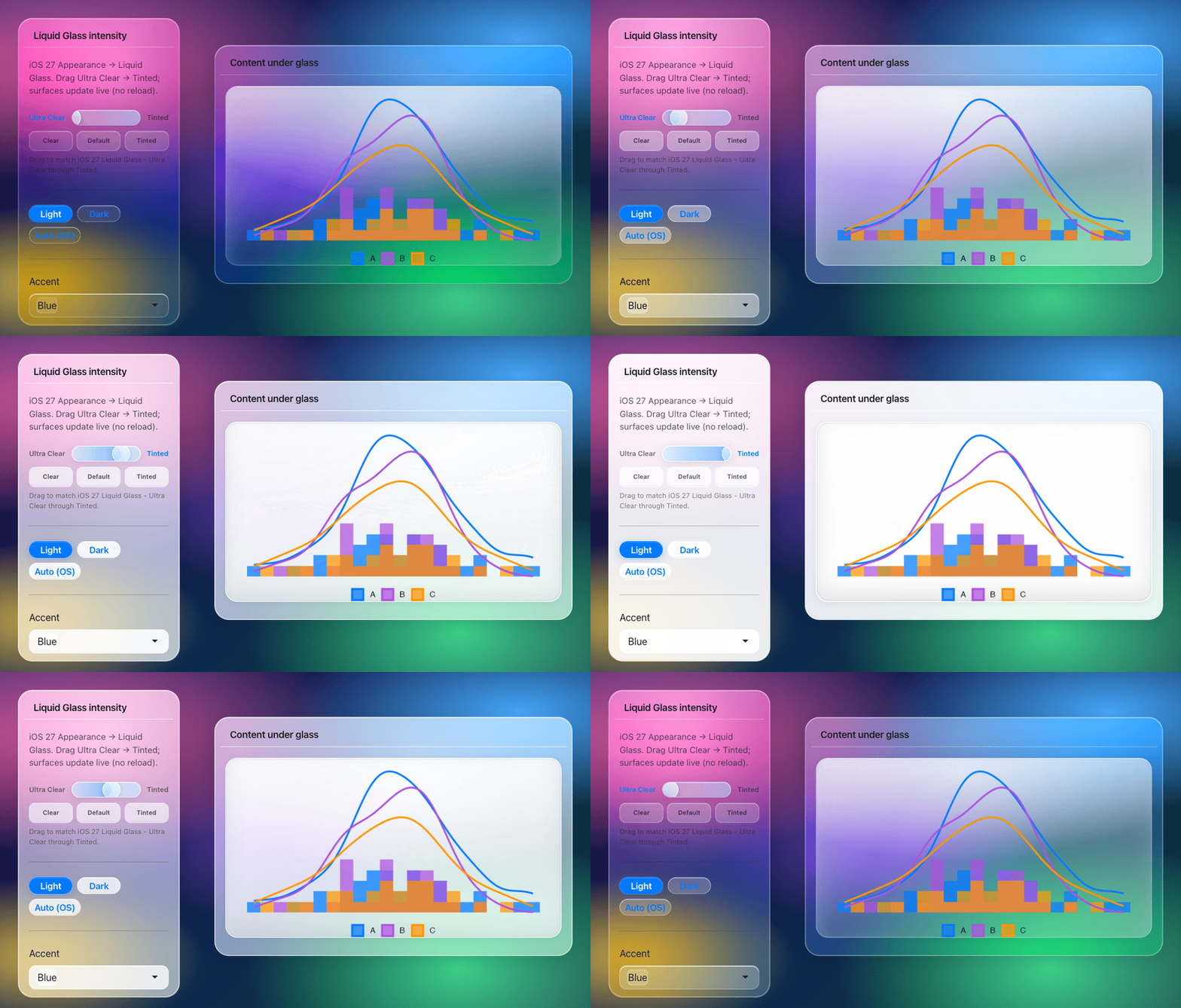
Intensity runs from 0 (Ultra Clear) to 1 (Tinted). The default is 0.5. Do not pass material = "clear"; that argument is deprecated.
The installed package has the full recipe (options, the 0.5.0 migration, and pitfalls): ?shinyglass and vignette("shinyglass").
Theming
The intensity slider mirrors iOS 27 Settings → Appearance → Liquid Glass
(continuous Ultra Clear → Tinted). The default is 0.5, Apple's midpoint.
Browsers cannot read that OS slider, so the in-app control is the supported
way to match the look. Reduce Transparency paints solid fills with no backdrop
blur. Increase Contrast and forced colors override the glass variables.
Defaults also follow iOS 27 as far as a browser can. Chromium refracts the
backdrop through a squircle lens. Safari and Firefox keep blur and tint.
Active pills and tabs spring into each other, buttons press with a short
spring, and floating bars pick up a scroll-edge fade. Tab bars shrink while
you scroll down, and on desktop dashboards the top bar shrinks into a
centred pill. Specular highlights follow the mouse over cards, bars and
buttons (pointer_specular = FALSE keeps them static). Pick the iOS 27
look with style = "clear" or style = "tinted", and turn every motion
effect off with motion = FALSE. Icons in
bars and non-primary buttons are monochrome clear glass (icon_style = "clear"). Pass icon_style = "color" to keep author colors. The detached
sidebar is opt-in: floating_sidebar = TRUE.
Dense charts and tables can opt into a regular panel with
glass_theme(plot_surface = "opaque") while nav and controls stay on glass.
The default "clear" look still shows the wallpaper through plot hosts.
Use glass_plot_surface_input() to toggle live (ggplot / plotly / gt / DT).
Named wallpaper scenes (tahoe, dusk, mesh, aurora, harbor, grove)
and optional wallpaper= photos stay behind a blur + wash so text meets the
contrast floor. For chromote, PDF, or screenshots, call glass_flatten() or
open the app with ?glass_flatten=1.
Text uses the system font on Apple devices. Elsewhere shinyglass serves a
bundled copy of Inter, tuned toward SF Pro, from the app itself with no
CDN. Inter is licensed under the SIL Open Font License 1.1 (see
inst/fonts/inter/OFL.txt). Pass font = "system" to use the platform
font instead.
Power users can read glass_css_tokens() and override --glass-* variables
with glass_theme(tokens = list(blur = "28px")) without forking SCSS.
Live demos
Apps may take a moment to wake up.
| Demo | Explore |
|---|---|
| Harbor notes | Flagship chat on Liquid Glass |
| Basics | Theme switching and core controls |
| Dashboard | Cards, plots, and tables |
| Inputs | Shiny input controls |
| Olympic medals | A complete dashboard |
These five are the hosted set. plotly + gt stays a local example in inst/examples/plotly-gt-demo.R.

Harbor notes is the flagship demo: a shinychat window on the dusk wallpaper, with a floating composer, a scripted reply (thinking, a citation, and a tide-table tool card), and an offcanvas sources panel. Open Harbor notes. The hosted app answers with Gemini Flash and falls back to a local script if the API errors. The same app is in inst/examples/shinychat-glass.
Compatibility
Built for Bootstrap 5 and bslib. See compatibility for supported widgets and older layouts.
More: examples · experimental Python package · testing · deployment